Caramba Switcher for Mac: what you pay for and when to replace it
In the US App Store Caramba costs $6.99 a year; its site says $4.99. What it buys, what it lacks, and when to pick Lang Switcher, Boomkey or LayFlip.
Published October 4, 2026
The Mac replacement: wrong keyboard language fixed on Space
$9.99 one time, no subscription · 14 days free, no card needed
In short
Caramba Switcher on a Mac works only on a yearly subscription. In the US Mac App Store it costs $6.99 a year, while Caramba's site says $4.99. If you type only Russian and English, it is worth that money, especially on macOS 12, 13 or 14 and if you want typo fixing and the letter ё: the program is alive, and its last update came out on September 22, 2026.
If you need Ukrainian or Hebrew, or do not want to pay every year, Caramba fits worse. Then look at LayFlip ($9.99 once, macOS 15 and later) or Boomkey ($14.99 once, macOS 14 and later, autocorrect in beta). On macOS 12 or 13, the only one you can pay for once is Lang Switcher: the US App Store lists lifetime licenses at $23.99 and $29.99, but the listing does not say which one applies, and there are complaints about stability. If it bothers you that Caramba, by users' accounts, fixes the last word on Enter and sends the message right away, LayFlip fixes nothing on Enter.
Caramba and three replacements in one table
Prices are in US dollars, from the US Mac App Store or the developers' sites, as of October 4, 2026. "Not stated" means the developer does not write about it.
| Caramba Switcher | Lang Switcher | Boomkey | LayFlip | |
|---|---|---|---|---|
| How you pay | subscription: $6.99 a year in the US App Store, $4.99 a year per Caramba's site | subscription or lifetime: $7.99 to $11.99 a year, $23.99 or $29.99 lifetime; the App Store does not say which price applies | $14.99 once | $9.99 once |
| Trial | yes; the App Store gives no length, the site says 3 days, the agreement 14 days | not stated | 7 days, no card | 14 days, no card |
| macOS | 12.0 and later | 10.15 and later | 14 and later | 15 and later |
| Computers | 3 per the site, Family Sharing in the App Store | not stated | 2 | 2 |
| Fixes automatically | English and Russian | layout list not published | on Space, in beta: English with Ukrainian, Belarusian, Hebrew, Russian | English with Russian, Ukrainian, Bulgarian, Greek, Hebrew, Arabic, Persian |
| Russian and Ukrainian between each other | no Ukrainian in the layout list | not stated | not stated | only on double Shift |
| Enter | per a review, fixes the last word and sends at once; the developer does not describe it | not described | messengers not described | does not fix: what is on screen goes out |
| Your own words and apps | exceptions for words and apps, you add words yourself | exceptions for apps | your own word list, off in any app | two word lists, a mode for each app |
How they differ in practice
What Caramba costs: three numbers from three places
In the App Store the program has been called Caramba Switcher Pro since September 2026, seller Sergey Moskalev. The download is free, there is a trial after install, and then you need a yearly auto-renewing subscription with Family Sharing. The in-app purchase list in the US App Store has one line: a yearly subscription at $6.99. The listing gives no trial length and says that the current price and terms are shown before purchase. The App Store will show the amount for your country at that moment.
Caramba's English site page says something else: a macOS license for 3 computers, 3 days free, then $4.99 a year. The button above that line leads to the same App Store. And there is a third period: the agreement for the App Store version, which has the year 2024 at the bottom, names a 14-day trial. Which figure is right for a purchase today, the developer does not explain. From here on we count at $6.99: that is the price the App Store shows a buyer in the US.

Subscription against a one-time payment works out like this. At $6.99 a year, Caramba is cheaper than LayFlip's $9.99 in the first year, and over two years it comes to $13.98, which is already more. At the site's $4.99, two years cost $9.98, almost level, and Caramba becomes the more expensive one in the third year. With Boomkey at $14.99 the break-even is further out: the third year at $6.99, the fourth at $4.99. If a whole family uses one subscription through Family Sharing, the math shifts in Caramba's favor.
Lang Switcher in the US App Store has five purchase lines: yearly at $11.99, $9.99 and $7.99, and lifetime at $23.99 and $29.99. Which of them apply now, the listing does not say. The $23.99 lifetime license costs less than Caramba's $6.99 subscription from the fourth year.
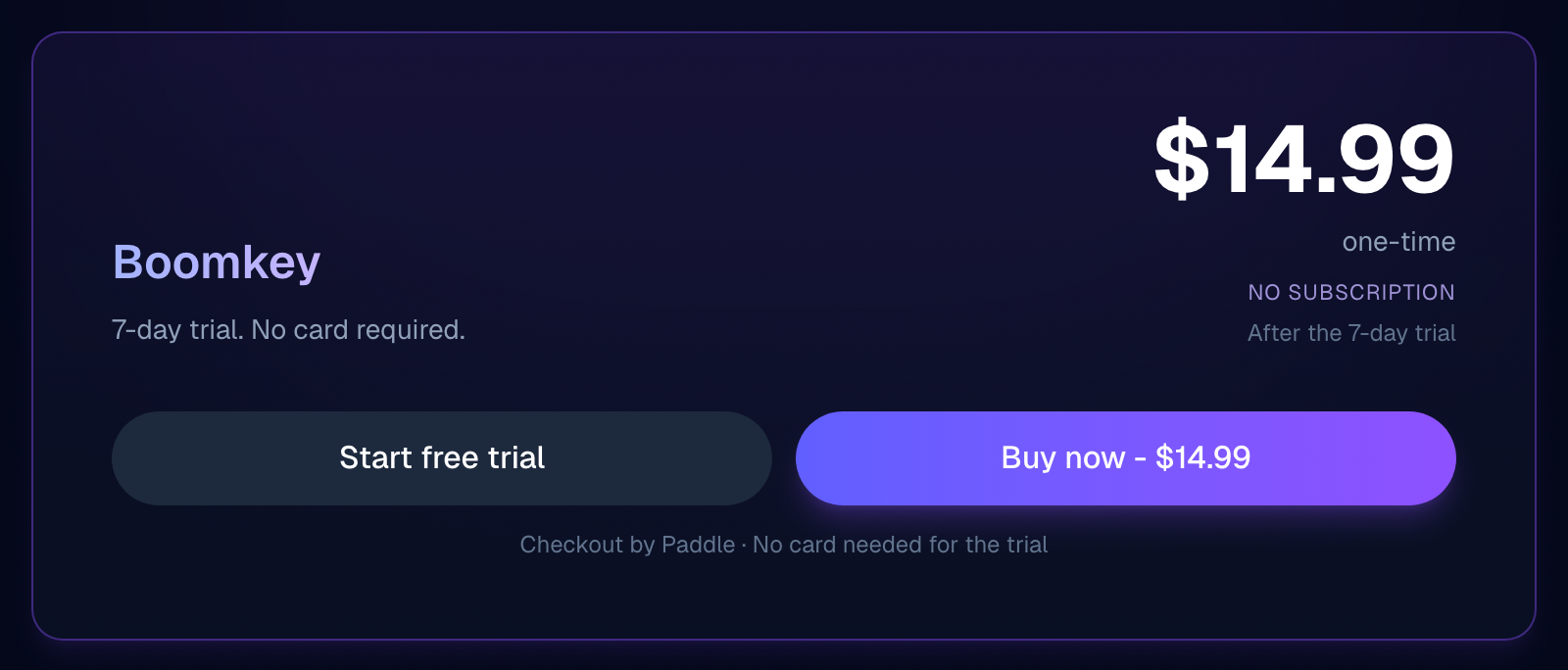
Boomkey costs $14.99 once: a 7-day trial with no card, a key for 2 Macs, a refund within 30 days. This is the price of the website version. The App Store sells a different program: it fixes selected text and does nothing on Space.
The very idea of a subscription is disputed. Some users think it is excessive:
Я понимаю, что любой труд должен быть оплачен, но переключатель клавиатуры, еще и с подпиской - это перебор.
Undated review in the Polish Mac App Store, Caramba Switcher Pro
Others call it inexpensive:
Приложение платное, распространяется по недорогой годовой подписке, однако доступна пробная версия в течение 14 дней.
Roman Miroshnichenko, Caramba Switcher for macOS review on yablyk.com
The review is old: the page says 2023, the metadata 2022. It gives no amount, and its 14 days match the agreement but not the site.
What the subscription pays for
The subscription pays for a product that is being developed, and that is worth saying plainly. The last update, 2026.09.22 from September 22, the developer describes like this: the program is updated for macOS 27, with improvements to the app switcher and Spotlight search. New features, according to the site, are put to a vote on social networks and in the Telegram channel.
Besides switching layouts, the Pro version fixes typos and puts in the letter ё by Russian rules (the "Ёfikator" feature), and the rules of its language model are topped up every week. The system language is changed with one Shift press, and a fixed word comes back with double Shift or a single press of Pause Break. A password you type, Caramba switches to the English layout by itself if it is longer than six characters and mixes lowercase, uppercase, digits or symbols. In development environments and games the automation switches itself off in most cases, and any game or app can be put into the Games folder, where auto-switching is off. And Caramba installs on macOS 12, three versions earlier than LayFlip and two earlier than Boomkey.
Those who stayed with it for the long run praise it for not needing fiddling:
Самое крутое, что все нативно работает, и обучается.
Undated review in the Kazakhstan Mac App Store, Caramba Switcher Pro
The author has used it for three or four years. Part of the "learning" he praises, the developer removed in September 2026: more on that below, in the section on exceptions.
Languages: English and Russian, and only those
Caramba's site names the layouts like this: English (US), Russian and "Russian PC". There is no Ukrainian, Belarusian or Kazakh, and reviews notice it right away:
Также нет автоматического переключения для украинского языка.
Undated review in the German Mac App Store, Caramba Switcher Pro
The same author writes that the layouts switch in a circle and cannot be limited to Ukrainian and English, and that he went back to Punto. If you also came from Punto Switcher, what is going on with it on a Mac today is covered separately. With a third layout, Polish, reviews differ: for one user the Polish and Russian pair does not work, for another everything works, auto-switching included.
The most unexpected thing here was written by Caramba itself. In 2023 its Telegram channel recommended another program, Lang Switcher:
Разработчик предлагает одноразовую оплату, кажется дружит с украинской раскладкой и использует принципиально другие алгоритмы работы автопереключения.
Caramba Switcher Telegram channel, post from July 7, 2023
Lang Switcher is called Smart Language Switcher in the App Store, seller Ihor Prodan, and works from macOS 10.15. The developer does not publish a layout list. A user from the Ukrainian App Store writes:
Automatic switching between three languages works properly.
Undated review in the Ukrainian Mac App Store, Smart Language Switcher
The same person went back to an old two-language program because Lang Switcher skipped letters. There are several similar complaints, one of them about macOS Tahoe:
The application behaves very unstably even in manual switching mode.
Undated review in the Ukrainian Mac App Store, Smart Language Switcher
The latest Lang Switcher version, 3.14.0, came out on February 12. The page shows no year; going by the order of entries, it is 2026.
Boomkey fixes English paired with Ukrainian, Belarusian, Hebrew and Russian on Space by itself, and that feature is in beta. Whether it tells Russian from Ukrainian is not stated. LayFlip fixes English paired with Russian, Ukrainian, Bulgarian, Greek, Hebrew, Arabic and Persian, but does not switch Russian and Ukrainian between each other on its own, only on double Shift.
Enter in messengers
The main complaint about Caramba is not about price. A user in the US App Store writes that fixing after Enter cannot be turned off: in a messenger Caramba fixes the last word and sends the message right away (undated review). Another says the same more briefly:
The program can independently send messages to the chat when it is not required.
AndrewSirius, review in the Ukrainian Mac App Store, August 13, 2025
We found not a word about Enter from the developer: not on the site, not in the help, not in the Telegram channel. Whether there is a setting is known only from a user, and he writes that there is not.
This is a trade-off, not just a bug. If the last word was typed in the wrong layout, fixing on Enter saves retyping. If you needed it exactly as typed, the message has already gone. LayFlip chose the opposite: on Enter the text goes out exactly as you see it. That means a word followed straight by Enter is not fixed. Nothing extra flies into the chat, but the last word goes out as typed if you did not finish it with a space.
Boomkey does not write about Enter in messengers. In its changelog for September 24, 2026, there is one line about Enter: in Chrome's address bar it now searches for the fixed word. Lang Switcher writes nothing about Enter.
Exceptions that do not hold
No way to make it register an exception - it registers when it wants, but sometimes it keeps converting the same word.
Undated review in the US Mac App Store, Caramba Switcher Pro
The developer has struggled with exceptions for a long time and told in Telegram himself how he changed the scheme. In the first version an exception was created automatically when the user undid a switch with double Shift. What came of it:
И вот в исключения стали залетать слова, написанные правильно!
Caramba Switcher Telegram channel, post from November 14, 2022
By the time of that post the scheme had already been replaced. If a word switched by mistake, you erase it, type the one you need and press Space, and only then does the program offer to create an exception. In the same post the developer called this scheme the most workable. In update 2026.09.20 that one was removed too: according to the developer in the version history, automatic exception creation when you retype a word went wrong too often. Now you add words to "Exceptions" yourself, and the ones saved earlier stay. The most frequent words, abbreviations and single letters cannot be added there: the developer writes that this would break the language model.
The review above is undated, so it is unclear whether it is about the old logic or the new. And the praise for self-learning in the yablyk.com review, where the program remembers your words and no longer touches them, describes automation that no longer exists in that form.
What Caramba cannot do, in its own words
Caramba wrote the most honest criticism itself. On the English page of the site there are seven items:
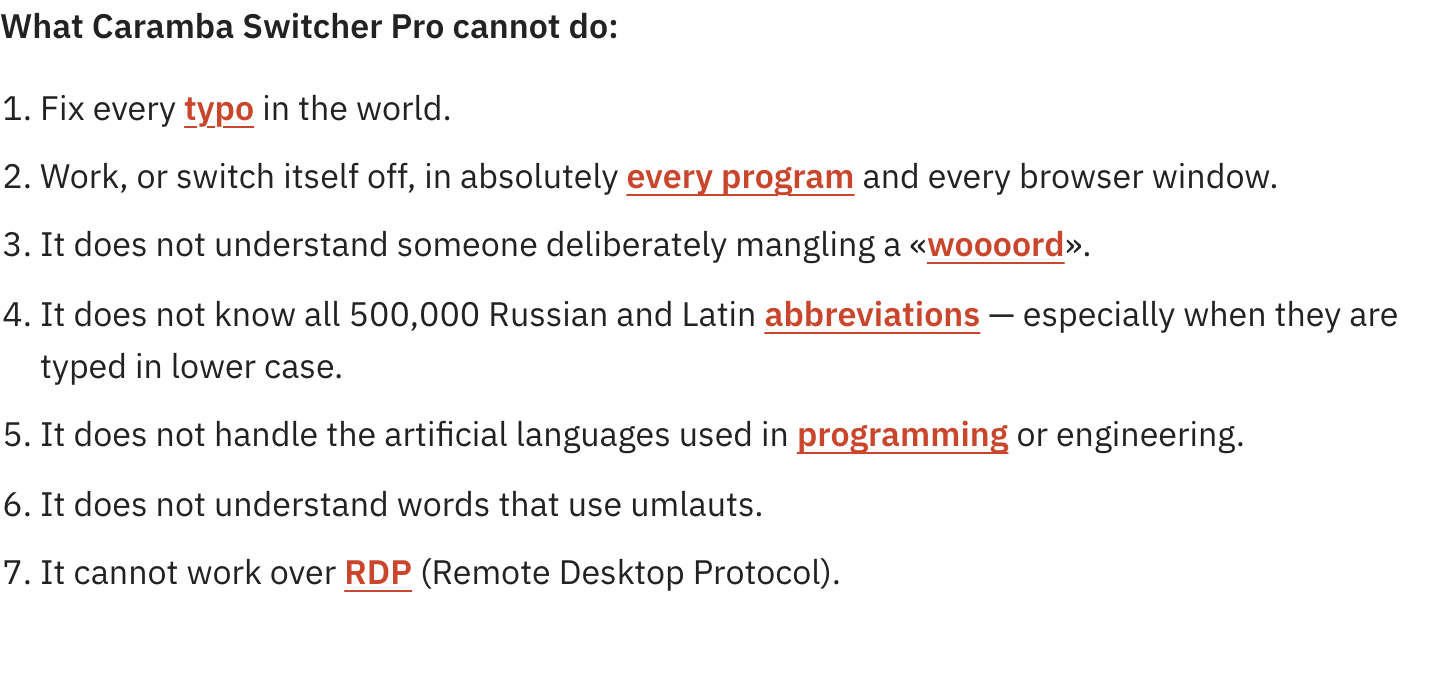
Three of them concern readers of this page directly. Words with umlauts: if you live in Germany and write in German too, test your words during the trial. A user from the German App Store complains that even after training Caramba tries to convert the German "mit" to Russian, and asks at least for a blacklist of words. Programming languages: in development environments Caramba is off by default, and only since version 2026.02.23, which came out in February 2026, can you turn it on for a specific app. And RDP, remote desktop: Caramba does not work through it. LayFlip is no replacement here: it also does nothing in remote apps, more on that below.
What they see and what they send
Any auto-switcher sees every keystroke, otherwise it would not notice "ghbdtn". In a discussion of a similar program on Hacker News this was called a huge security problem, and it was answered there that this is how any program granted Accessibility works. So what is worth comparing is what each developer writes about data and permissions:
- Caramba. To install, the developer asks you to drag its icon into the Accessibility window and does not mention Input Monitoring. Under the policy for the App Store version it collects no personal data, downloads dictionary updates from cdn.caramba-switcher.com, checks the license through macOS and the App Store, and may send error reports and summaries of how the program ran. What is in those reports is not stated. The App Store privacy label lists a device identifier not linked to identity.
- Lang Switcher. The policy from September 2022 is written from a template: data stays on the device, logs may be collected after an error. What the program sends beyond that, the developer does not write.
- Boomkey. The policy from May 13, 2026: Boomkey itself does not collect, store or pass on personal data, and goes online only to check the license and updates. It needs one permission, Accessibility.
- LayFlip. Asks for two permissions, Accessibility and Input Monitoring. What it sends is covered below, in the section on the trial.
Where LayFlip is weaker
- It needs macOS 15 or later. It will not install on macOS 12, 13 and 14, while Caramba will. On 14, Boomkey installs too.
- Russian and Ukrainian do not switch between each other on their own, only on double Shift. Macedonian and Serbian are also fixed only on double Shift.
- It does not fix on Enter. A word followed straight by Enter goes out as typed.
- In remote apps, in Screen Sharing, Parallels, VMware Fusion, UTM, TeamViewer, AnyDesk and others, LayFlip does nothing: the keys are handled by another computer. It does not remove Caramba's RDP limitation.
- A key works on 2 Macs. Caramba's site promises 3 computers, and the App Store has Family Sharing.
- After the 14-day trial, autocorrect works only with the $9.99 key. Double Shift stays free.
- We found no independent reviews of LayFlip, good or bad. Everything said about it here comes from its own description.
What to pick
- You write only Russian and English and want the program to fix typos and put in ё as well: Caramba. In the US App Store that is $6.99 a year.
- A Mac on macOS 12 or 13: of these four, Caramba and Lang Switcher will install. If you do not want a subscription: Lang Switcher has lifetime licenses at $23.99 and $29.99, but the listing does not say which applies, and there are complaints about stability. On macOS 14, Boomkey joins them. LayFlip needs macOS 15.
- You need English with Ukrainian or Hebrew and want to pay once: LayFlip on macOS 15 and later. On macOS 14, Boomkey, but its autocorrect is still in beta.
- You need English with Bulgarian, Greek, Arabic or Persian: of these four, only LayFlip claims autocorrect for them.
- You write Russian, Ukrainian and English and the program has to tell all three apart by itself: Caramba and LayFlip do not do this, and for Boomkey it is not stated. Try Lang Switcher and check it on your macOS version: it has stability complaints.
- You want Enter to send exactly what is on screen: LayFlip. You want the last word fixed before Enter too: going by reviews, Caramba works that way.
- You write German too: Caramba itself warns about umlauts. Test your German words during the trial of any program before paying.
- You just need to switch language, with no autocorrect: macOS itself is enough, here is how to change the language on a Mac.
How to test a replacement next to Caramba
The easiest way to test is on your own conversations, and you do not need to cancel your Caramba subscription beforehand:
- Install LayFlip. macOS will ask you to allow Accessibility and Input Monitoring: without them LayFlip cannot see keys and cannot retype a word.
- If Caramba is running, LayFlip will warn you that another switcher is working, so words are not fixed twice. Quit Caramba for the length of the trial and compare the programs one at a time.
- In a messenger, type ghbdtn and finish with a space or punctuation mark. The word is retyped as "привет", and the layout switches with it, no hotkeys needed.
- The Enter test: type a word in the wrong layout and press Enter right away. The message goes out exactly as you see it, that is, with the word unfixed. Before sending, you can flip such a word with double Shift.
- You needed the word exactly as typed: press Shift twice before the next one begins, it comes back, and LayFlip remembers it. Words that must not be touched can be added in advance to the "Never correct" list, and for any app you can choose a mode: autocorrect, keys only or off. Need a separate key for switching layouts, like Alt+Shift in Windows? In LayFlip you can choose a modifier key, it is off by default.
- You write Ukrainian: English with Ukrainian is fixed automatically. Russian and Ukrainian do not switch between each other on their own, only on double Shift.
- LayFlip checks what you type against dictionaries inside the app and sends it nowhere, and it contacts layflip.com only to register the license and check for updates. It never touches password fields. In terminals, code editors and password managers autocorrect is off by default and only the keys work, and in password managers it cannot be turned on.
- The first 14 days are free, no card needed. After that, a $9.99 key, once and with no subscription, for 2 Macs, with free updates for all 1.x versions. You can get a refund within 60 days of purchase. The key is needed only for autocorrect, double Shift stays free. You need macOS 15 or later: on macOS 12, 13 and 14 this trial is not possible, and you have to choose between Caramba, Lang Switcher and, on 14, Boomkey.
Verdict
For one kind of reader Caramba on a Mac justifies the subscription: someone who writes Russian and English, wants the program to fix typos and put in ё as well, or is on macOS 12, 13 or 14. For that reader $6.99 a year in the US App Store pays for a program that is already updated for macOS 27 and honestly lists what it cannot do. The unpleasant part: Caramba names the price and the trial length differently in different places and does not explain it.
For everyone else it fits worse, and the reasons are named by Caramba itself: there is no Ukrainian in the layout list, and its own channel recommended Lang Switcher, mentioning the Ukrainian layout. If you do not want to pay every year, the macOS version decides: on 15 and later, LayFlip at $9.99 once; on 14, Boomkey at $14.99 with autocorrect in beta; on 12 and 13, a Lang Switcher lifetime license at $23.99 or $29.99, with caveats about which price applies and about stability. If it irritates you that Enter sends the fixed word, LayFlip does the opposite, and you pay for that with the last word, which goes out as typed.